KDE Artwork Tutorials  |

This handbook contains various tutorials that could be helpful when creating artwork for KDE.

submitted by land0 on May 1, 2006
»login or register to post comments

Krita plugins tutorial-author Boudewijn Rempt   |

Krita is quite extensible. You can add new filters, of course, and chunks of user interface like scaling dialogs, and new tools — like weird and wonderful selection tools or a path tool like the one that is right now being worked on for Google’s Summer Of Code. But also new ways for existing tools to paint. I’m working on a Chinese brush simulation based on Clara Chan’s interpretation of Strassman’s Hairy Brushes for Krita 1.6. And finally, you can add complete new colorspaces. We’ve already got various rgb, cmyk and grayscale colorspaces, and also xyz, lab, yuv and lms — but there is no end to the possibilities.

However, the best API is useless without a good tutorial, and I’ve just completed the first draft of Developing Krita Plugins. Apart from extending Krita with C++ plugins (and, if you manage to get automake and gcj to play ball, java), you can use Krita’s document scripting interface to create scripts in python and ruby. And there’s dcop, too, of course, but that’s not as well documented.

So, if you’ve always thought Krita was nothing more than a glorified icon editor, you can now change that. Go ye therefore, and code all kinds of plugins, extending Krita in weird and wonderful ways, in C++ and Java and Python and Ruby.

ps. What I also wanted to say… Krita’s got a pretty good manual, too, in case you just wanted to use this icon editor.


Read More....
submitted by theobroma on June 20, 2006
»read more | login or register to post comments

Changing the konqi logout image.  |
submitted by land0 on May 24, 2006

Kipi Plugins tutorial: libkipi | |

This page will tell you both how to develop a new plugin for KIPI, and how to add KIPI support to a new application (referred to as host application).


http://developer.kde.org/documentation/library/3.5-api/extragear-libs-apidocs/libkipi/html/index.html
submitted by theobroma on May 12, 2006
»login or register to post comments

Icon Bootcamp.  |
Want to learn to draw icons? Enlist in Icon Boot Camp!

FIRST ASSIGNMENT

Make an icon for an application to wash a car (or any other

application). Here is the specification: it has to be a 2D pixel image,

size 32x32 pixels, in black and white on a transparent background.

Black and white icons are hard to make, you can not use colors to set

objects apart. You will have to keep it 2D. Making a black and white

icon may be the most valueable learning expercience you ever get (in

the icon field...). For pixel images you can for instance use the GIMP.

submitted by land0 on May 1, 2006

Creating a SuperKaramba desklet.  |

Themes in SuperKaramba consist of two parts:  
1. A .theme file that defines the shape and size of the theme, and possibly many other things.  
 

Basic Instructions for creating the .theme file.

 
2. A .py file that adds interactivity to the theme. Basically, whenever
an event happens, such as the user clicking the mouse on your theme, a
function is called in your python script to let you react to the event.
 
Basic Instructions for writing the .py file.

Quick Links:

submitted by land0 on April 28, 2006
»read more | login or register to post comments

How to add SuperKaramba desklets.  | |
Download and install SuperKaramba. Once SuperKaramba is installed: (as of KDE 3.5 SuperKaramba is bundled with the base install)
Download and unzip the theme archive. You can put it in any directory
you want. Run SuperKaramba, select "Open Theme", and open the .theme
file from wherever you unzipped the theme archive.
submitted by land0 on April 28, 2006
»login or register to post comments

How do I install a new icon theme?  | |

This works for KDE 3.x:

On your keyboard press ALT+F2 and then type kcontrol into the input
field, then, press [ENTER].

Now you have started the KDE Control Center, and from here you'll be able to install icon themes. On the left bar select : Appearance & Themes->Icons.

Here you can choose between installed themes and install new ones.

Note: Many people make the mistake of unpacking packages, this is wrong, the icon installer expect to open a compressed package files that usually have extensions like: *.tar.gz , *.tgz, *.tar.bz2

submitted by land0 on April 28, 2006
»read more | login or register to post comments

How to make business cards-author wiki.scribus.net   |

First set up the dimensions with some guides to help in the process.

For 8.5 x 11 size paper:

  1. Create new document (8.5 x 11 inches and .5 inch margins, default unit *inches*)
  2. Page -> Manage guides:
  3. Add Horiz. Guides at 0.5, 2.5, 4.5
  4. Add Vert. Guides at 0.5, 4.0, 4.5, 8.0
  5. View -> show guides
  6. Page -> snap to guides
  7. Insert shape (rectangle) to fit in upper left area sized for a typical 2x3.5 inch business card, and resize so that it fills entire region bounded by the guide.
  8. Now design your card within that region.
  9. Group all the elements of the card together as a single unit.
  10. <uncheck> Page -> Snap to Guides
  11. Select the business card
  12. Item -> Multiple duplicate -> No. copies = 1, Horiz shift = 3.50, Vert. Shift = 0.00
  13. Select the top row and multiple duplicate vertically to fill the page.
  14. Item -> Multiple duplicate -> No. copies = 4, Horiz shift = 0.00, Vert. Shift = 2.00
  15. Done.

Read More....
submitted by KA.o web team on February 22, 2006
»read more | login or register to post comments

Simple Scribus Spot Colour Printing method-author Erik Collou   |
  • Produce a document using 2 (or more) colours.
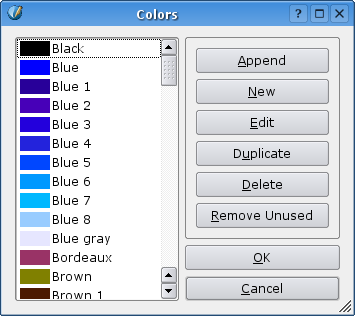
  • Remove the unused colours using the colour manager.

Image:Colour manager.png

  • Save and export to pdf for reference.
  • Open the file and change one of the used colours to white, using the colour manager. (remove, and assign white when asked)

Read More....
submitted by KA.o web team on November 25, 2005
»login or register to post comments

kde-artists.org© 2004-2006 Sponsored by Revelinux©
Powered by Drupal©