
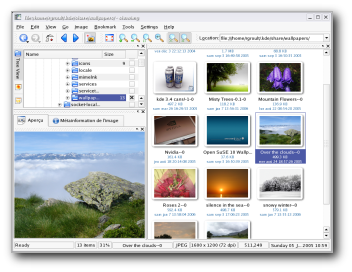
What is ShowImg?  |

ShowImg is a feature-rich image viewer for KDE including an image management system. It is highly configurable and supports numerous image formats.

You can learn more in the ShowImg section of this site. 

submitted by theobroma on May 16, 2006
»login or register to post comments

What is KPhotoAlbum?  |

KPhotoAlbum is a tool which you can use to easily sort your images. It provides many functionalities to sort them and find them easily.

Take the 3 minute KPhotoAlbum tour or see the Videos at KPhotoAlbum's Homepage to learn more and see some screen shots, or read the FAQ.

You can also learn more in the KPhotoAlbum section of this site. 

submitted by theobroma on May 16, 2006
»login or register to post comments

What are the Kipi Plugins?  |

Kipi plugins are additional functions for the KDE Images Managment Host Programs like digiKam, KPhotoAlbum, Gwenview and ShowImg. They can add extra menus and shortcuts, and extend the host programs features.

Here is a list of just a few useful plugins that are a part of Kipi: the border Images plugin, the CD archiving plugin, the convert images plugin and the filter images plugin.

You can learn more in the Kipi Plugins section of this site. 

submitted by theobroma on May 12, 2006
»login or register to post comments

KDE Desktop  |
submitted by KA.o web team on May 2, 2006
»login or register to post comments

Installing KDE artwork  |
submitted by KA.o web team on May 2, 2006
»login or register to post comments

What can I do with my user points?  |

    There are many things you will be able do with your user points. You will be able to use them to aquire badges that can be include in the sig line of your email etc... Eventually you will even be able to use points to purchase merchandise from REVELinux Gear. Here is how it works every KDE-Art related link, remote news item or article submited by you gives you points. You can see how many points you or another user has by viewing the user by points page. As you accumulate enough points you may use them to purchase the items mentioned above. In other words you get something in return for contributing to KDE-Artists.org. If you save up and get some REVELinux Gear you are also promoting the project whos merchandise you recieve. All because you are an active KDE-Artists.org member.

submitted by land0 on May 2, 2006
»login or register to post comments

What is SuperKaramba?  |

SuperKaramba is, in simple terms, a tool that allows you to easily
create interactive eye-candy on your KDE desktop. Currently, only Linux
is officially supported.  

How does it work?  
Theme writers create themes, or text files that define their widget.
Then they can optionally add python scripting to make their widget
interactive. The possibilities are endless!   

Here are just some examples of the things that can be done:  
Display system information such as CPU Usage, MP3 playing, etc.  
Create cool custom toolbars that work any way imaginable 

submitted by land0 on April 28, 2006
»read more | login or register to post comments

How to add SuperKaramba desklets.  | |
Download and install SuperKaramba. Once SuperKaramba is installed: (as of KDE 3.5 SuperKaramba is bundled with the base install)
Download and unzip the theme archive. You can put it in any directory
you want. Run SuperKaramba, select "Open Theme", and open the .theme
file from wherever you unzipped the theme archive.
submitted by land0 on April 28, 2006
»login or register to post comments

How do I install a new icon theme?  | |

This works for KDE 3.x:

On your keyboard press ALT+F2 and then type kcontrol into the input
field, then, press [ENTER].

Now you have started the KDE Control Center, and from here you'll be able to install icon themes. On the left bar select : Appearance & Themes->Icons.

Here you can choose between installed themes and install new ones.

Note: Many people make the mistake of unpacking packages, this is wrong, the icon installer expect to open a compressed package files that usually have extensions like: *.tar.gz , *.tgz, *.tar.bz2

submitted by land0 on April 28, 2006
»read more | login or register to post comments

Can I use HiColor and LoColor Icons in other projects?  |
The other KDE icons, like the older HiColor and LoColor ones, have the following license:
"The images inside this directory are COMPLETELY FREE for commercial and non-commercial use."
submitted by land0 on April 28, 2006
»login or register to post comments

kde-artists.org© 2004-2006 Sponsored by Revelinux©
Powered by Drupal©