KDE Icon Guidelines  |
This handbook contains various guidelines that should be considered before creating icons intended for use within the default KDE. (Most of these articles are excerpts from the wiki.kde.org.)
submitted by KA.o web team on April 15, 2006
»login or register to post comments

New Icons for Amarok |
COME AND GET EM!!!! There is a new icon set available for Amarok. If you are using Amarok 1.4.6 then they are included. If not you can grab them from the link. There are generic instructions for installing the icons as well as a source file available. The source file contains instructions for quickly recoloring the icons if you choose. These icons are licensed under the lgpl so any derivative works should be as well.
http://amarok.kde.org/forum/index.php/topic,14132.0.html
submitted by land0 on June 24, 2007
»login or register to post comments

Download the Oxygen color palette!-author the Oxygen developers   |
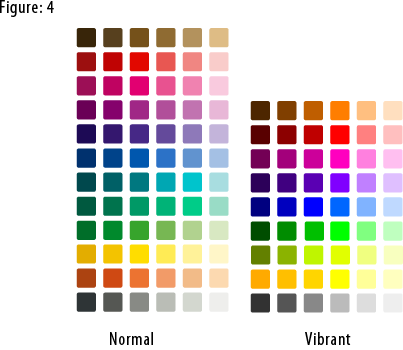
Oxygen has one color palette with two parts. “Normal” colors have sober tonalities of the most needed colors. These are used mostly for mimetypes, folders, system applications and actions. Vibrant colors are more saturated used to emphasize important action icons on a toolbar, for rich media mimetypes, for application icons and, generally speaking, used when there is need to focus the attention of the user on a particular element, helping the user to find his way by following a “subliminal” color language.

Figure 4

To download the Oxygen color palette for the Gimp: right click this link, then click Save As.

To use this palette in Inkscape:
1) In your .inkscape folder make another folder called palettes.
2) Put the oxygen.gpl file in that folder.
3) Restart Inkscape
4) Select the Oxygen palette in the Swatches dialog (Ctrl+Shift+W).

The Oxygen color palette is released under the Creative Commons Attribution-NonCommercial-NoDerivs 2.5 License.

Thanks to Nuno Pinheiro for giving us permission to publish the Oxygen color palette on this site.


Read More....
submitted by KA.o web team on November 5, 2006

Icon Bootcamp.  |
Want to learn to draw icons? Enlist in Icon Boot Camp!

FIRST ASSIGNMENT

Make an icon for an application to wash a car (or any other

application). Here is the specification: it has to be a 2D pixel image,

size 32x32 pixels, in black and white on a transparent background.

Black and white icons are hard to make, you can not use colors to set

objects apart. You will have to keep it 2D. Making a black and white

icon may be the most valueable learning expercience you ever get (in

the icon field...). For pixel images you can for instance use the GIMP.

submitted by land0 on May 1, 2006

The KDE Crystal Theme Icon License Add-on  |

This copyright and license notice covers the images in this directory.
Note the license notice contains an add-on.

KDE Crystal theme icons.
Copyright (C) 2002 and following years KDE Artists
This library is free software; you can redistribute it and/or modify it under
the terms of the GNU Lesser General Public License as published by the Free
Software Foundation, version 2.1 of the License.

This library is distributed in the hope that it will be useful, but WITHOUT ANY WARRANTY; without even the
implied warranty of MERCHANTABILITY or FITNESS FOR A PARTICULAR PURPOSE. See the GNU Lesser General Public
License for more details. You should have received a copy of the GNU Lesser General Public License along
with this library; if not, write to the

submitted by land0 on April 28, 2006
»read more | login or register to post comments

Toolbar and Application Icons.  |

In KDE there are basically two types of icons. There exist special guidelines for each of these:

Toolbar icons are very often concrete icons They are pictures or close representations of the operations which they represent. Toolbar icons are generally used much more than application icons. So one needs to find them and recognize the purpose they resemble fast. Therefore they are usually more symbolic and simple than application icons to improve usability. Toolbar icons are tools one just wants to use. Making them toodetailed would decrease usability a lot.

Application icons being used to start applications, to resemble folders, mimetypes and devices. They are are abstract designs that may have only a superficial or simplified representation of the operation. Some bear no relation to the functionality at all. Instead application icons try to be much more unique, original and beautiful. They are the brand of the application and are used to "advertise" the application (Think of the CorelDraw icon - If you wouldn't know what this icon is about you would never guess that a vector-graphic-application starts once you click on it).

submitted by land0 on April 28, 2006
»read more | login or register to post comments

How do I install a new icon theme?  | |

This works for KDE 3.x:

On your keyboard press ALT+F2 and then type kcontrol into the input
field, then, press [ENTER].

Now you have started the KDE Control Center, and from here you'll be able to install icon themes. On the left bar select : Appearance & Themes->Icons.

Here you can choose between installed themes and install new ones.

Note: Many people make the mistake of unpacking packages, this is wrong, the icon installer expect to open a compressed package files that usually have extensions like: *.tar.gz , *.tgz, *.tar.bz2

submitted by land0 on April 28, 2006
»read more | login or register to post comments

Can I use HiColor and LoColor Icons in other projects?  |
The other KDE icons, like the older HiColor and LoColor ones, have the following license:
"The images inside this directory are COMPLETELY FREE for commercial and non-commercial use."
submitted by land0 on April 28, 2006
»login or register to post comments

Can I use the Crystal Icons in other projects?  | |

The short and simple answer to all
these questions is: Yes, you can. The longer answer is: Yes,
you can, if you comply with the appropriate license
.

The first version of the Crystal Icons was created by Everaldo. Later others
joined, among them the highly productive Torsten. They are licensed under the
LGPL. To prevent possible misunderstandings an add-on is added to the license
notice:

This copyright and license notice covers the images in this directory.

Note the license notice contains an add-on.

**************************************************************************

KDE Crystal theme icons.

Copyright (C) 2002 and following years KDE Artists

This library is free software; you can redistribute it and/or

modify it under the terms of the GNU Lesser General Public

License as published by the Free Software Foundation,

version 2.1 of the License.

This library is distributed in the hope that it will be useful,

but WITHOUT ANY WARRANTY; without even the implied warranty of

MERCHANTABILITY or FITNESS FOR A PARTICULAR PURPOSE. See the GNU

Lesser General Public License for more details.

You should have received a copy of the GNU Lesser General Public

License along with this library; if not, write to the Free Software

Foundation, Inc., 59 Temple Place, Suite 330, Boston, MA 02111-1307 USA

**** NOTE THIS ADD-ON ****

The GNU Lesser General Public License or LGPL is written for software libraries

in the first place. We expressly want the LGPL to be valid for this artwork

library too.

KDE Crystal theme icons is a special kind of software library, it is an

artwork library, it's elements can be used in a Graphical User Interface, or

GUI.

Source code, for this library means:

- for vectors svg;

- for pixels, if applicable, the multi-layered formats xcf or psd, or

otherwise png.

The LGPL in some sections obliges you to make the files carry

notices. With images this is in some cases impossible or hardly useful.

With this library a notice is placed at a prominent place in the directory

containing the elements. You may follow this practice.

The exception in section 6 of the GNU Lesser General Public License covers

the use of elements of this art library in a GUI.

kde-artists [at] kde.org

++++++++++++++++++++++++++++++++++++++++++++

Below is the text of the LGPL version 2.1
submitted by land0 on April 28, 2006
»read more | login or register to post comments

Pixels vs. Vector  |

Icons are pixel images or
vector images. Both have their pitfalls. Understanding these pitfalls
will make you a better icon maker.

Icons used to be made as
pixel images. Often the artist would make a 32x32 icon, and then
scale it down to 16x16. Scaling the icon down makes it fuzzy, the
artist had to repair it. Sometimes the 32x32 icon had to be
simplified in order to make it possible to scale it down. Going back
and forth between the icons the artist produced two icons that looked
the same. Each time a new size is added a new icon has to be made.
The number of icons in a set can become so big, the icon set becomes
unmaintainable. Enter vectors.

submitted by land0 on April 28, 2006
»read more | login or register to post comments

kde-artists.org© 2004-2006 Sponsored by Revelinux©
Powered by Drupal©