|
|
|
Sunday, 05 November 2006 11:11 pm GMT Orc and Red Griffin found by Liftarn  
|
| submitted by land0 on February 5, 2007 | |
|
|
|
|
For all the artists out there that use inkscape to create and edit your SVG images, you might like to know that there are some nifty new features that will be included in the upcoming 0.45 release of inkscape. Probably the most exciting new feature is the support for SVG filters. This functionality was developed by the Google Summer of Code 2006 participants. The only filter that is enabled to date is the Gaussian Blur. "With it, you can softly and naturally blur any Inkscape objects: paths, shapes, groups, text], images. Clones inherit blurring from their original, but they can also be blurred independently from the original (you can create blurred clones with Tile Clones, too). Both the fill and stroke of an object are blurred together, creating semitransparent margins that smoothly blend into the background." - Inkscape Wiki, 0.45 Release Notes
|
| submitted by land0 on February 5, 2007 | |
|
|
|
|
The test site for using ccHost as the main engine has been going great over the past month or so.
Below are a few facts of the current usage of the cchost site: We now have 46 registered users on the ccHost version of the Open Clip Art Library We now have 683 public domain cliparts uploaded into the cchost version of the Open Clip Art Library. Of the 56 images that were gifted to us by worldlabel.com, there are only 10 images remaining to be converted. There are only a few remaining tasks to be completed before we can go fully live with cchost as out main engine for clipart uploading and browsing. These include the tasks like the integration of thumbnails into the browsing process and the importing of all the images that are in the old archives over into the ccHost engine.
|
| submitted by land0 on February 5, 2007 | |
|
|
|
|
Tuesday, 10 October 2006 12:50 am GMT Today, the Uploading of clipart on the old site was disabled, and everyone that wishes to upload to the Open Clip Art Library will be redirected to the ccHost site.This is a great step forward for the implementation of cchost as the primary engine for uploading, downloading and organising the library's image collection. If this is the first time that you have uploaded to ccHost, you HAVE to register before you can upload. This simple process allows you to upload, rate and review all the clip art in the library.If you have any questions or problems, use the normal communication channels that are outlined in the wiki.
|
| submitted by land0 on February 5, 2007 | |
|
|
|
|
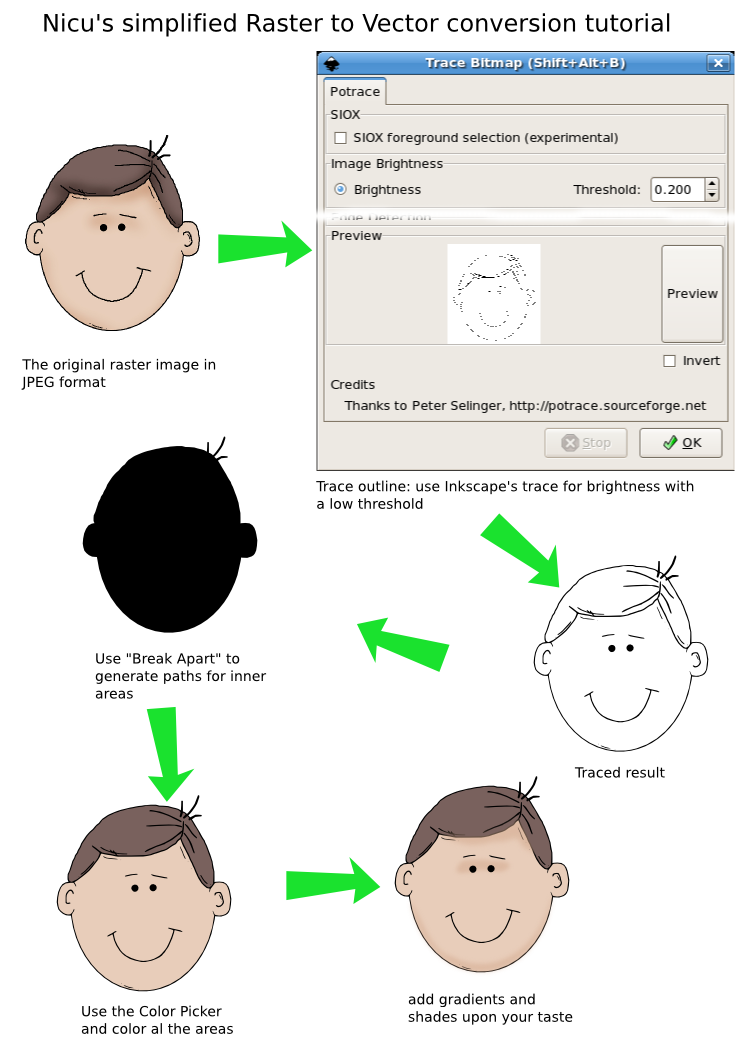
Nicu has uploaded a great tutorial for converting a simple Raster image into a Vector Image. This process is ideal for converting the images that were gifted to us by worldlabel.com. The tutorial is in the "Examples" section, or you can find it here All the worldlabel.com images are now uploaded into the requests section, so if you have some time, keep converting them and uploading. ![]()
|
| submitted by land0 on February 5, 2007 | |
|
|
|
|
The Open Clip Art Library has had a nice contribution of images from worldlabel.com. Thanks! Unfortunately, these images are in bitmap formats.This means that we need these images converted from jpeg to svg, before they can be included in the Open Clip Art Library collection.Jon has uploaded some of the worldlabel bitmaps as "requests" (these are found by clicking the Requests tab above) redo them as vector (while possibly improving them) and then re-uploading them as a remix of the original image.So far, the "borders" images of the worldlabel collection are the only images that have been uploaded to ccHost. (And a fair few have been converted already) When the majority of the images have been converted, the next batch of images will be uploaded, ready to be converted.
|
| submitted by land0 on February 5, 2007 | |
|
|
|
|
Hello, our new engine, ccHost, now accepts SVG files thanks to the great work by Roan! Everyone should +10 thank him! Please see the great functioning test site: http://www.openclipart.org/cchostSo, please help us best by uploading test SVG files to this installation. We hope to move to it very shortly (hopefully within the week).There are still a few tasks in the migration we need help with such as:
- export of our content from the old system to the new one
- SVG thumbnails
- writing metadata to SVG files in getid3
- migration of old web content from old site to the new one
The tasks are listed on the ccHost Migration page on the wiki. Please e-mail the mailing list or hop onto our chat channel, #openclipart on irc.freenode.net if you want to help out. We are very close now to switching to this new infrastructure.
|
| submitted by land0 on February 5, 2007 | |
|
|
|
Oxygen has one color palette with two parts. “Normal” colors have sober tonalities of the most needed colors. These are used mostly for mimetypes, folders, system applications and actions. Vibrant colors are more saturated used to emphasize important action icons on a toolbar, for rich media mimetypes, for application icons and, generally speaking, used when there is need to focus the attention of the user on a particular element, helping the user to find his way by following a “subliminal” color language.
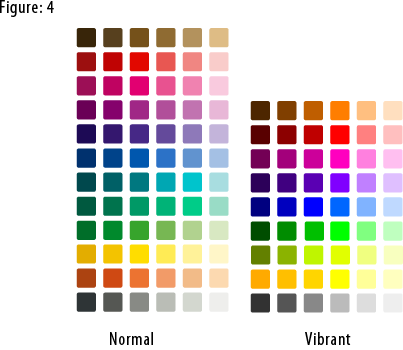 To download the Oxygen color palette for the Gimp: right click this link, then click Save As. To use this palette in Inkscape:
1) In your .inkscape folder make another folder called palettes.
2) Put the oxygen.gpl file in that folder.
3) Restart Inkscape
4) Select the Oxygen palette in the Swatches
dialog (Ctrl+Shift+W).
The Oxygen color palette is released under the Creative Commons Attribution-NonCommercial-NoDerivs 2.5 License. Thanks to Nuno Pinheiro for giving us permission to publish the Oxygen color palette on this site.
Read More....
|
| submitted by KA.o web team on November 5, 2006 | |
|
|