Kesäkoodi  |

Yesterday was the first day of Kesäkoodi 2006 which allows me to drop off my regular (sometimes boring) summer time job as a train driver and lets me concentrate fully on Scribus. Thanks to HKL they made it possible for me to keep my train driving license (so I’ll be still able to work there [...]

submitted by land0 on June 1, 2006
»read more | login or register to post comments

File Loader  |

After much wailing, gnashing of teeth and general procrastination by many.. today’s show is brought to you by the letters w, o, r, k, i, n and g! The aging (read, since 1.3.1) FileLoader plugin system can finally load a Scribus 1.2.x document without the AGES old scribusXml.cpp anymore. All very technical for those that [...]

submitted by land0 on June 1, 2006
»read more | login or register to post comments

Changing the konqi logout image.  |
submitted by land0 on May 24, 2006

New version of the kipi-plugins-author Tom Albers   |

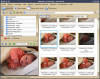
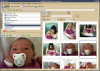
Photographing is very popular (or is it over already?). When you want to make them publically available there is always the trouble how to do that. Untill now Digikam, KPhotoAlbum, Showimg and Gwenview where a bit low on features in this regard.

With the release of the second release candidate of the kipi-plugins there are two new plugins which you can use with all above applications.

Click the 'Read more' link to learn more and see the screenshots. 


Read More....
submitted by theobroma on May 13, 2006
»read more | login or register to post comments

digiKam blogs 
submitted by theobroma on May 8, 2006

Gwenview Filtering-author Aurélien Gâteau   |

A few weeks ago a Gwenview user asked if it would be possible to implement file name filtering. I initially answered that while the idea was nice, I didn't have time to work on it.

Of course, one should never trust me when I answer mails too quickly. A few days later, it turned out I needed such a feature. So I decided to implement it.

It started as a simple lineedit to filter filenames:
Gwenview file filter, first version

But this was not handy for me: I needed to filter images by file date. So I ended up implementing it as a toolbar button. When clicked it reveals a few fields to filter by name and/or by date, like this:
Gwenview file filter, second version

All this is available from your nearest KDE SVN mirror.


Read More....
submitted by theobroma on May 8, 2006
»read more | login or register to post comments

Elephants Dream is released!-author    |
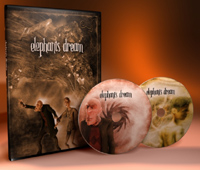
Elephants Dream, Open Movie DVD  € 39.00  € 35.00    

 Elephants Dream, Open Movie DVD


Six experienced artists/developers have worked in Amsterdam for seven months to create an exciting short 3D movie with Blender. Not only that but the movie itself has been be published under the Creative Commons, all the production files as used for the movie are included as well, free to be reused.

On the Extended Edition DVD (two disks) you will find
- The movie in best DVD quality widescreen format (versions in both NTSC and PAL)
- 34 subtitle languages
- Making Of documentary, showing the creation process
- Commentary tracks by the creators
- All .blend files, models, textures, and so on... the material used to create the movie.
- The original script, breakdown, storyboards

Get your copy today! 


Read More....
submitted by KA.o web team on May 8, 2006
»read more | login or register to post comments

A digiKam Overview-author digiKam.org   |

digiKam is an advanced digital photo management application for KDE, which makes importing and organizing digital photos a "snap". The photos can be organized in albums which can be sorted chronologically, by directory layout or by custom collections.

Tired of the directory constraints? Don’t worry, digiKam also provides tagging functionality. You tag your images which can be spread out across multiple folders and digiKam provides fast and intuitive ways to browse these tagged images. You can also add comments to your images. digiKam makes use of a fast and robust database to store these meta-information which makes adding and editing of comments and tags very reliable.

digiKam makes use of KIPI plugins for lots of added functionality. KIPI (KDE Image Plugin Interface) is an initiative to create a common plugin infrastructure for digiKam, KimDaBa, Showimg, and GwenView. Its aim is to allow development of image plugins which can shared among KDE graphical applications.

An easy to use interface is provided that enables you to connect to your camera and preview, download and/or delete your images. Basic auto-transformations can be operate on the fly during pictures downloading.

The digiKam Image Editor has its own plugin subsytem which some core plugins (for eg, redeye correction) provided with the main application. Additional plugins are available from DigiKamImagePlugins. These plugins provide new image enhancement options like color managment, image filters, or special effects.

A stand alone image editor version named ShowFoto is also available. This one run without digiKam images database support, but support all Image Editor plugins.


Read More....
submitted by theobroma on May 4, 2006
»read more | login or register to post comments

Official KDE Fonts  |

Taken from the KDE Corporate Identity Guidelines on wiki.kde.org.

"Typeface

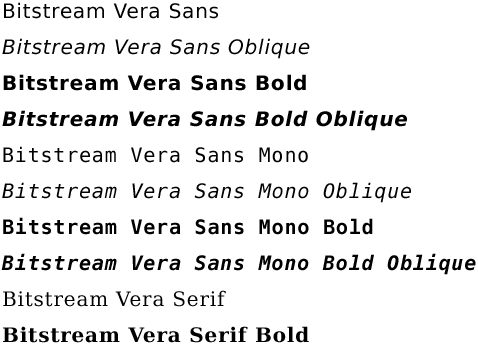
The KDE project uses a typeface called "Bitstream Vera Sans Bold" for all printed and screen material.

Bitstream Vera Sans Bold

As the Bitstream Vera family only provides support for the standard
TrueType character set (Latin1). To provide support for additional
languages the font has been extended by third parties. As the Bitstream
Vera font license doesn't allow modifications of the font using the
original font name the extended versions are available under new names:

submitted by land0 on May 3, 2006

A web interface to digikam (continued)-author Antonio Larrosa   |

During last weekend I managed to find some time to continue developing the web interface for digikam that I mentioned in a previous blog entry, so I added some new features:

* When viewing the contents of an album, now it's possible to search for images/movies from that album having a tag associated.
* When viewing the list of albums, it's possible to search for images/movies among all albums having a tag associated.
* When viewing any set of images (like the contents of an album, or the result of a search in an album), you can click on "Download images" and it will generate a tar file in the cache directory containing the images the user is viewing in the selected size. If someone else tries to download the same set of images, the same tar file is reused.
Read More....
submitted by theobroma on May 3, 2006
»read more | login or register to post comments

kde-artists.org© 2004-2006 Sponsored by Revelinux©
Powered by Drupal©