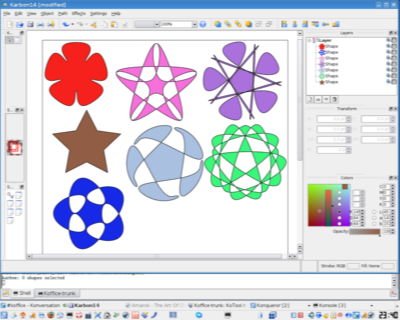
Look what Karbon can do…-author Boudewijn Rempt   | |
Karbon in trunk has gained an amazing new shape (and because it’s a Flake shape every other KOffice application can or will be able to use it, too.) Starting out with a simple star, Jan Hambrecht has created these wonderful objects:
Read More....
submitted by theobroma on November 13, 2006
»login or register to post comments

Color management in Koffice-author Casper Boemann   | |
Krita has always been able to do color management of it's images. I've now begun bringing that technology to the rest of KOffice. This will be another important step in bringing KOffice 2.0 up in the big league.

Color management is a very important feature in a professional setting like printing and web design. To understand what it is all about think of a webdesigner. She sits at her own computer and creates a page with colors that look stunning on her monitor. Unfortunately no two monitors show colors in the same way, so without colormangement it might look quite different when someone else views it on another monitor.

The way color management ensures that colors look the same on both (and indeed every) monitor is through the use of profiles. It's possible to measure the profile of a monitor. So the color management software just have to tweek the rgb triplets so the visual effect is the same.
Read More....
submitted by theobroma on June 4, 2006
»read more | login or register to post comments

ShowImg Overview-author    |

Currently implemented features include:

Viewer

  • display JPEG, PNG (alpha layer supported), GIF, XCF, PSD, etc. files;
  • open several directories, and archives (.tar.gz, .tar.bz2, .zip, rar, ...);
  • apply filters to displayed image;
  • preview, fullscreen, slideshow, ``fit-to-screen'', efficient zoom;
  • open files with external programs;
  • support EXIF header (JPEG file metadata);
  • display a hexadecimal view;
  • play yout video files.

Management

  • manage all you photos (in a database using KexiDB (Get Kexi Now!) ;
  • batch rename;
  • search for exact and similar images;
  • several formats conversion;
  • manage photo albums.

Configuration


Click the 'Read more' link below to see if there has been an update to this list of features.


Read More....
submitted by theobroma on May 16, 2006
»read more | login or register to post comments

New version of the kipi-plugins-author Tom Albers   |

Photographing is very popular (or is it over already?). When you want to make them publically available there is always the trouble how to do that. Untill now Digikam, KPhotoAlbum, Showimg and Gwenview where a bit low on features in this regard.

With the release of the second release candidate of the kipi-plugins there are two new plugins which you can use with all above applications.

Click the 'Read more' link to learn more and see the screenshots. 


Read More....
submitted by theobroma on May 13, 2006
»read more | login or register to post comments

Kipi Plugins Overview-author extragear.kde.org/apps/kipi   |

The most stable KipiPlugins tarball is version 0.1.0-rc2.
Currently implemented plugins are:

  • NEW SimpleviewerExport: export your images in a nice flash movie.
  • NEW HTMLGallery: export your images to HTML
  • RawConverter: A raw image converter for digital cameras.
  • SlideShow: Slideshow with effects ripped out from kslideshow and 3D effects using OpenGL.
  • MpegEncoder: Create an MPEG slideshow from your images.
  • PrintWizard: A wizard to print images in various format.
  • JpegLossLess: Batch process your JPEG images without losing meta information and compression.
  • CdArchiving: Archive your albums on CD or DVD using K3b.
  • ScanImages: Scanner management using Kooka.
  • ScreenshotImages: Snap screen based on KSnapshot and adapted to Kipi.
  • Calendar: A plugin to create calendars.
  • SendImages: A plugin to send images by email, allowing resizing and recompressing before sending.
  • RenameImages: Batch image renamer.
  • ConvertImages: Batch image converter.
  • BorderImages: Add border to your images in batch.
  • FilterImages: Batch image enhancer using digital filters.
  • ColorImages: Batch image color enhancer.
  • EffectImages: Batch image transformation effects.
  • ResizeImages: Batch image resizer.
  • RecompressImages: Batch image recompressor.
  • FindDuplicateImages: Find duplicate images in albums.
  • WallPaper: Set your image as wallpaper.
  • TimeAdjust: Adjust image file time and date.
  • GalleryExport: Interface for export images collections to remote Gallery web server.
  • KameraKlient: Digikam 0.6.2 Gphoto2 interface ported as a Kipi plugin. Note: this plugin is disabled in digiKam release >= 0.7.x because this part have been re-written from scratch using KIO Slaves.

libKipi core is stable and has been released as libkipi 0.1.3.

Click the 'Read more' link below to see if there has been an update to this list of features.


Read More....
submitted by theobroma on May 12, 2006
»read more | login or register to post comments

Gwenview Filtering-author Aurélien Gâteau   |

A few weeks ago a Gwenview user asked if it would be possible to implement file name filtering. I initially answered that while the idea was nice, I didn't have time to work on it.

Of course, one should never trust me when I answer mails too quickly. A few days later, it turned out I needed such a feature. So I decided to implement it.

It started as a simple lineedit to filter filenames:
Gwenview file filter, first version

But this was not handy for me: I needed to filter images by file date. So I ended up implementing it as a toolbar button. When clicked it reveals a few fields to filter by name and/or by date, like this:
Gwenview file filter, second version

All this is available from your nearest KDE SVN mirror.


Read More....
submitted by theobroma on May 8, 2006
»read more | login or register to post comments

A digiKam Overview-author digiKam.org   |

digiKam is an advanced digital photo management application for KDE, which makes importing and organizing digital photos a "snap". The photos can be organized in albums which can be sorted chronologically, by directory layout or by custom collections.

Tired of the directory constraints? Don’t worry, digiKam also provides tagging functionality. You tag your images which can be spread out across multiple folders and digiKam provides fast and intuitive ways to browse these tagged images. You can also add comments to your images. digiKam makes use of a fast and robust database to store these meta-information which makes adding and editing of comments and tags very reliable.

digiKam makes use of KIPI plugins for lots of added functionality. KIPI (KDE Image Plugin Interface) is an initiative to create a common plugin infrastructure for digiKam, KimDaBa, Showimg, and GwenView. Its aim is to allow development of image plugins which can shared among KDE graphical applications.

An easy to use interface is provided that enables you to connect to your camera and preview, download and/or delete your images. Basic auto-transformations can be operate on the fly during pictures downloading.

The digiKam Image Editor has its own plugin subsytem which some core plugins (for eg, redeye correction) provided with the main application. Additional plugins are available from DigiKamImagePlugins. These plugins provide new image enhancement options like color managment, image filters, or special effects.

A stand alone image editor version named ShowFoto is also available. This one run without digiKam images database support, but support all Image Editor plugins.


Read More....
submitted by theobroma on May 4, 2006
»read more | login or register to post comments

A web interface to digikam (continued)-author Antonio Larrosa   |

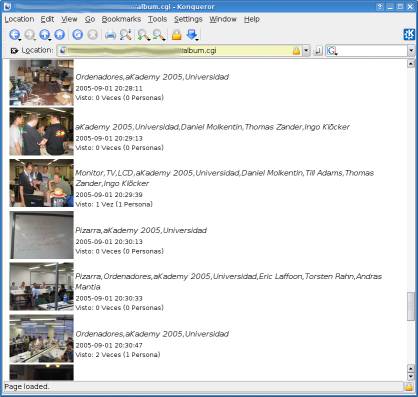
During last weekend I managed to find some time to continue developing the web interface for digikam that I mentioned in a previous blog entry, so I added some new features:

* When viewing the contents of an album, now it's possible to search for images/movies from that album having a tag associated.
* When viewing the list of albums, it's possible to search for images/movies among all albums having a tag associated.
* When viewing any set of images (like the contents of an album, or the result of a search in an album), you can click on "Download images" and it will generate a tar file in the cache directory containing the images the user is viewing in the selected size. If someone else tries to download the same set of images, the same tar file is reused.
Read More....
submitted by theobroma on May 3, 2006
»read more | login or register to post comments

The Open Clip Art Library  |

The Open Clip Art Library (OCAL) aims to create
an archive of user contributed clip art that may be freely used. The
project's reason for providing this clip art is to make open source
applications more useful to users; for some users, the availability of
good clip art that can be quickly dropped into a document to dress it
up can be as important as any other feature in the application.

The project was started in early 2004 as a spinoff from Inkscape by
Bryce Harrington and Jon Phillips as a way to help consolidate SVG
images contributed by Inkscape users with similar collections from
other projects. It was directly inspired by the Sodipodi Flags Clipart
project
from 2003. 

submitted by land0 on April 28, 2006
»read more | login or register to post comments

A web interface to digikam-author Antonio Larrosa   |

Currently I have 21458 photos according to digikam's database (which are using 13 Gb according to du ). When someone asks me to put some album in my web server I hate to lose my time exporting to html, generating thumbnails and resized 1024x768 versions of my pictures which occupy space in my HD that I'm usually hesitant to remove.

Also, when kimdaba exports the images to html, it includes the associated tags, but digikam doesn't. which makes digikam's web exports be a bit unusable for me.

So last saturday evening I started a new project: Creating a web interface to digikam.

DigiwebKam

digiwebKam 


Read More....
submitted by theobroma on April 25, 2006
»read more | login or register to post comments

kde-artists.org© 2004-2006 Sponsored by Revelinux©
Powered by Drupal©