|
That Which Would Become Inkscape: Bryce's story |

|

|

|
|
 I had been leading a project called WorldForge
for several years. I hadn't founded that project but had fallen into
the project coordinator role pretty early on. Unfortunately, I can't
report that we delivered very much, but I certainly learned a lot. I
learned that there is a balance to be struck between creatively cool
ideas and delivering something that people can actually use. I learned
that success is more than just being right. I learned about the
importance of communities and just plain getting along with people. I
learned a LOT more... I had been leading a project called WorldForge
for several years. I hadn't founded that project but had fallen into
the project coordinator role pretty early on. Unfortunately, I can't
report that we delivered very much, but I certainly learned a lot. I
learned that there is a balance to be struck between creatively cool
ideas and delivering something that people can actually use. I learned
that success is more than just being right. I learned about the
importance of communities and just plain getting along with people. I
learned a LOT more...
Anyway, one day I was working on creating a map for
some RPG game idea we'd had. I'd done a lot of game world mapping using
a CAD program called Campaign Cartographer, and I'd wondered if there
was anything equivalent in the Open Source world. As I've written about recently,
I had learned that for an open source game development project, relying
on proprietary tools was bad. So in searching around, I came across
this SVG file format. A bit more searching and I found 'Sodipodi', the
only open source editor around for that.
I downloaded Sodipodi and tried it out. It crashed. It
crashed more. It crashed HARD. But SVG was TOO COOL. I joined the
mailing list. I just hung out silently for a long time. My first post was about getting it a bit better tested and more robust.
|
|
Last Updated ( Friday, 16 December 2005 )
|
|
Read more...
|
  Krita is a (pixel-based) painting and image editing application for KOffice. Krita
is part of KOffice since 1.4. Krita contains both ease-of-use and fun features
like guided painting (never before has it been so easy to airbrush a straight
line!) and high-end features like support for 16 bit images, CMYK and even
OpenEXR HDR images. Krita is a (pixel-based) painting and image editing application for KOffice. Krita
is part of KOffice since 1.4. Krita contains both ease-of-use and fun features
like guided painting (never before has it been so easy to airbrush a straight
line!) and high-end features like support for 16 bit images, CMYK and even
OpenEXR HDR images.
Download a klik image of Krita then read the Krita Manual (in PDF format).
|
|
Last Updated ( Saturday, 14 January 2006 )
|
|
Read more...
|
 Karbon14 is a vector-based drawing application for KOffice. It allows
artists to create complex drawings without losing image quality when zooming in
on, or resizing the drawing. You can use Karbon to add finishing
touches to diagrams created using Kivio or charts created using KChart.
Graphic design ideas can be quickly and easily transformed into high
quality illustrations with Karbon. Karbon14 is a vector-based drawing application for KOffice. It allows
artists to create complex drawings without losing image quality when zooming in
on, or resizing the drawing. You can use Karbon to add finishing
touches to diagrams created using Kivio or charts created using KChart.
Graphic design ideas can be quickly and easily transformed into high
quality illustrations with Karbon.
Karbon14 version 0.2 is part of the KOffice package. Download the latest release of KOffice version 1.4.2 to start make amazing SVG images with Karbon14.
|
|
Last Updated ( Monday, 09 January 2006 )
|
|
Blenderart magazine's 1st Issue! |
|
|
|

A new Blender Magazine in pdf format now is available for download.
Blender is the open source software for 3D modeling, animation,
rendering, post-production, interactive creation and playback.
The first volume of Blenderart includes a review of GIMP 2.34, a detailed tutorial
for modeling and animating a smart robot, a step by step introduction
to the BMG plugin, news from Blender development, and a gallery of
Mechanical artwork.
For more Blender fun check out these animated shorts from the 2005 Animation Festival.
|
|
Last Updated ( Friday, 02 December 2005 )
|
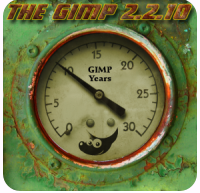
This past November the Gimp turned 10 years old!
GIMP is the GNU Image Manipulation Program. It is a freely
distributed piece of software for such tasks as photo retouching,
image composition and image authoring.
To mark this milestone
the Gimp developers had a 10th Anniversary GIMP
Splash Contest. The winner was Dialed In, a submission by
ix. It is the splash screen of the 2.2.10 anniversary
release. |
|
Last Updated ( Wednesday, 28 December 2005 )
|
 There are many ways to contribute to KDE. The first thing you
should do is to get familar with the KDE community. Try joining a few
mailing lists, lurk around at some KDE IRC channels (like #kde-artists, #plasma or #kde on the Freenode Network), read some articles
in the Guidelines and Tutorials section, or at developer.kde.org if you are a coder. Check out Kollaboration
to find a project you are interested in and jump in! There is always
someone around who is more then happy to help and give advice to new
contributors. There are many ways to contribute to KDE. The first thing you
should do is to get familar with the KDE community. Try joining a few
mailing lists, lurk around at some KDE IRC channels (like #kde-artists, #plasma or #kde on the Freenode Network), read some articles
in the Guidelines and Tutorials section, or at developer.kde.org if you are a coder. Check out Kollaboration
to find a project you are interested in and jump in! There is always
someone around who is more then happy to help and give advice to new
contributors.
Remember you don't have to be an artist or a coder to contribute to
KDE. We are always looking for new people to write articles and
documentation, take screenshots, and even us just give us opinions.
If you would like to contribute to this web site, please email us. We are currently looking for people to write news articles,
FAQs and tutorials. |
|
Last Updated ( Wednesday, 23 November 2005 )
|
|
Where do all the icons go? |
|
|
|
 This article hopes to clear up any confusion surrounding
where application developers and artists should install their KDE icons. This article hopes to clear up any confusion surrounding
where application developers and artists should install their KDE icons.
First some (simplified) history:
KDE 1 used
locolor icons, they only have 16 colors and look pretty plain. KDE 2
used the hicolor theme, similar style to locolor but with more colors.
KDE 3 changed to the CrystalSVG theme which we know and love today. 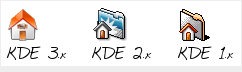
KDE
3 also saw the adoption of the freedesktop.org standard which changed
hicolor from being an artistic theme to being the fall-back folder. The
hicolor theme was renamed to kdeclassic and most of the icons were
moved to kdeartwork/IconThemes.
|
|
Last Updated ( Thursday, 24 November 2005 )
|
|
Read more...
|
|
|
The Open Clip Art Library |
|
|
|
 The Open Clip Art Library (OCAL) aims to create
an archive of user contributed clip art that may be freely used. The
project's reason for providing this clip art is to make open source
applications more useful to users; for some users, the availability of
good clip art that can be quickly dropped into a document to dress it
up can be as important as any other feature in the application. The Open Clip Art Library (OCAL) aims to create
an archive of user contributed clip art that may be freely used. The
project's reason for providing this clip art is to make open source
applications more useful to users; for some users, the availability of
good clip art that can be quickly dropped into a document to dress it
up can be as important as any other feature in the application.
The project was started in early 2004 as a spinoff from Inkscape by
Bryce Harrington and Jon Phillips as a way to help consolidate SVG
images contributed by Inkscape users with similar collections from
other projects. It was directly inspired by the Sodipodi Flags Clipart
project from 2003.
|
|
Last Updated ( Tuesday, 13 September 2005 )
|
|
Read more...
|
|
|
|



 Home
Home 





