digiKam blogs News feeds
submitted by theobroma on May 8, 2006

digiKam has a new Kipi Plugin to export pictures to an IPod device-author  digiKam | News feeds

This week, Seb Ruiz, a developper from Amarok team have created a new kipi plugin to export album collections to an Ipod device.

An Ipod interface already exist in Amarok to export music. Seb have contributed to kipi-plugins project to add the same feature on all kipi host applications like digiKam.

Take a look into the Seb blog for details.

submitted by theobroma on September 22, 2006

digiKam has a new Kipi Plugin to synchronize pictures with a GPS device-author  digiKam | News feeds

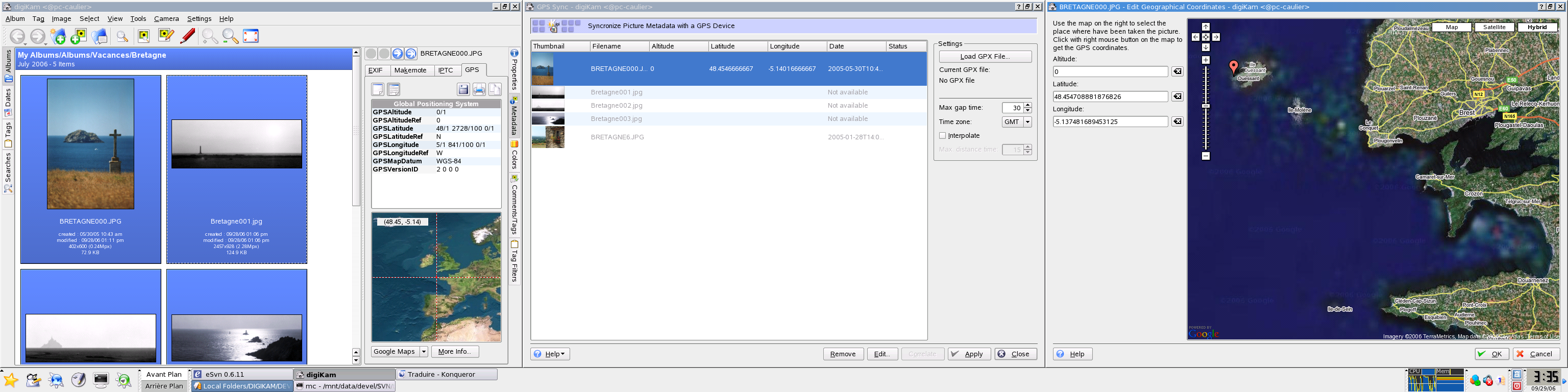
Since digiKam provide a GPS locator, we need a tool to set the GPS informations in pictures.

This week, i have created a new kipi plugin for that : GPSSync.

This plugin use a GPX data file generated by a GPS device and set the Exif GPS metadata of pictures to correlate the date from the camera pictures and the GPS device.

There is a screenshot of this plugin in action at this url

submitted by theobroma on September 21, 2006

Exiv2 0.11 is out!-author  digiKam | News feeds

Exiv2 0.11 library is now available for download. This new release include 2 new file format :

- Sony Alpha 100 ARW raw files.
- PNG.

Look the full announce on the web project page

I recommend all digiKam users to use this new version with the recent digiKam/DigikamImagePlugins 0.9.0-beta2 packages.

submitted by theobroma on September 17, 2006

RAW converter Kipi plugin re-written from scratch-author  digiKam | News feeds

Since Paco work on digiKam/DigikamImagePlugins 0.9.0-beta2 tarballs, svn is frozen until this release is completed.

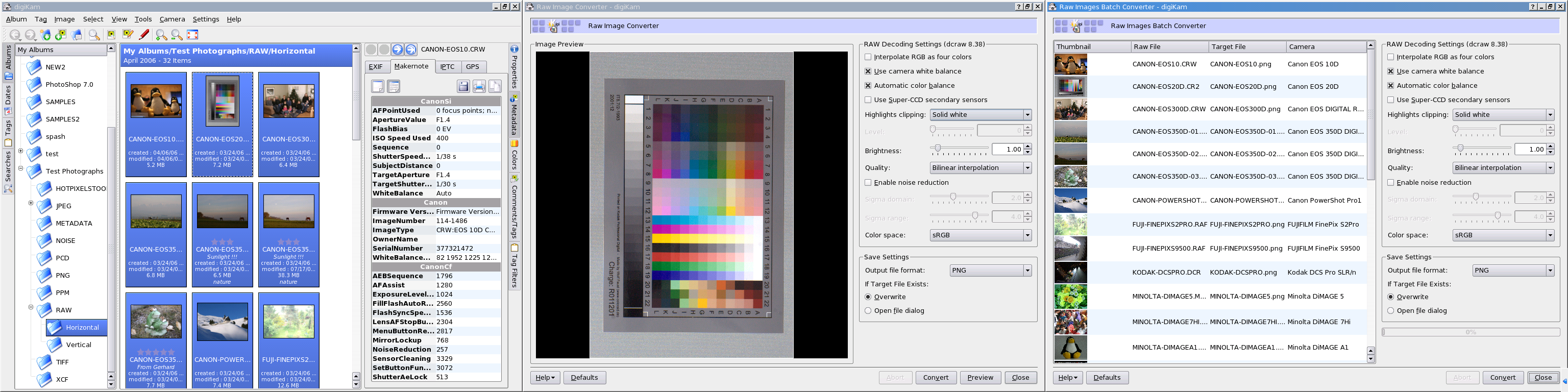
This week i have toggle to kipi plugins to re-write completly the RAW converter plugin. See below the new features :

- Fully compatible with the last dcraw version available .
- A lots of new conversion options (look the screenshoots at this url).
- Color space profile saved to target images.
- Metadata preservation during conversion (Exif/makernote) using Exiv2 library (JPEG/PNG).
- Using multithreading.

submitted by theobroma on September 15, 2006

digiKam and DigikamImagePlugins 0.9.0-beta2 in the way-author  digiKam | News feeds

Paco working actually on next 0.9.0-beta2 release. Test packages are available at this url. Please report all compilation problems to the [email protected] mailing list.

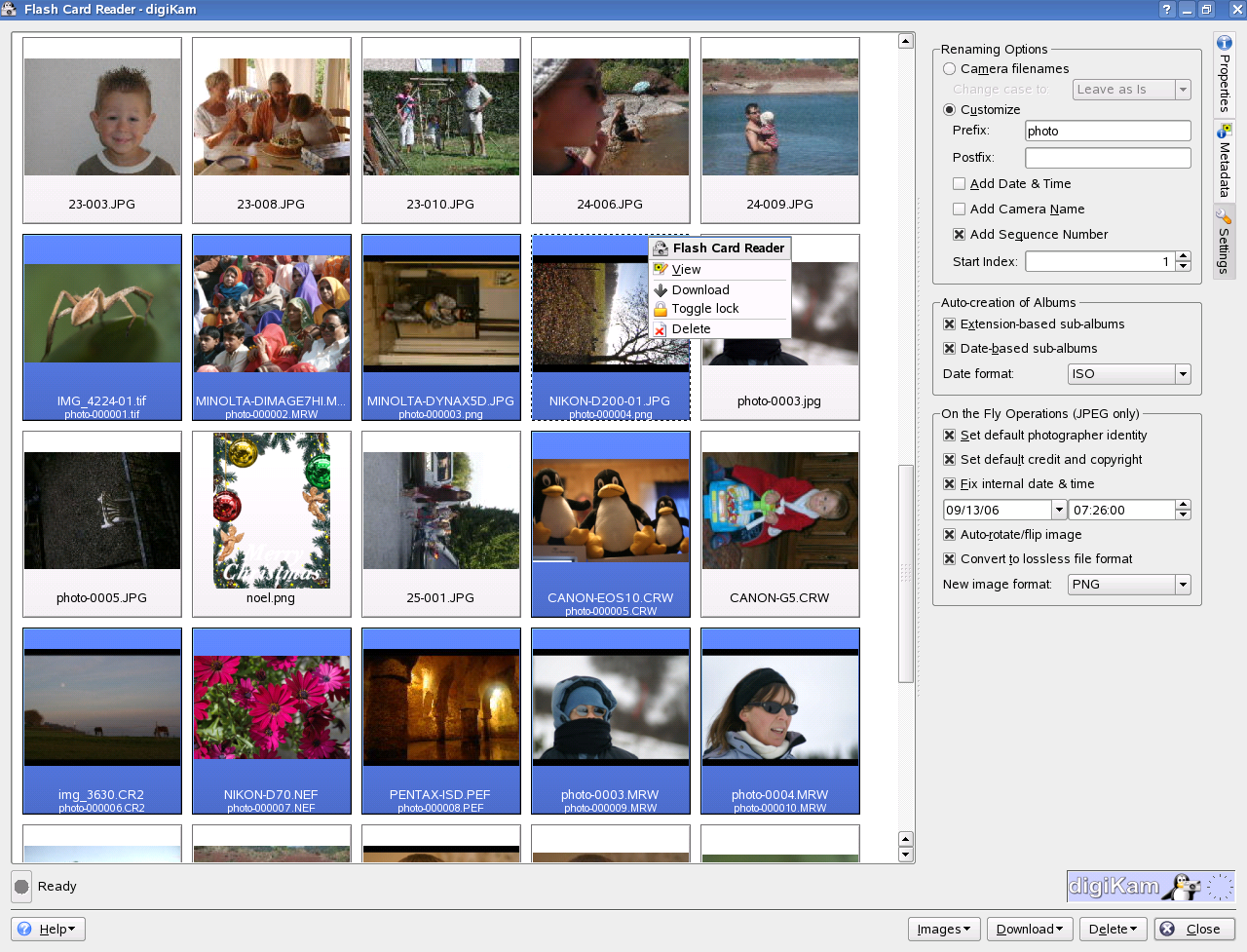
Over 50 bug entries in B.K.O have been fixed with this release and lots of new features have been added, especially in camera interface. Take a look at the current NEWS file for details.

There is a fresh camera interface screenshot available at this url

submitted by theobroma on September 13, 2006

digiKam and DigikamImagePlugins 0.9.0-beta1 released: thanks to Renchi...-author  digiKam | News feeds

Just after having released the first digiKam version 0.8.0 during august 2005, I have started to work on 0.9.0 features. The main goal of this release has been to support 16 bits color depth images including RAW pictures.

At this date, Renchi Raju (the digiKam project former) has left the team and is going to work with PalmOs in California... But before leaving the digiKam project, he has provided a great first implementation of a new internal digiKam API named DImg to support 16 bits color depth images...

Until now, I have worked hard to improve this API and I've been assisted by Marcel. We have created a very well documented API similar to QImage, but on top of it with an implementation for loading and saving files featuring
a progress bar and full control over the loading process (loading thread).

submitted by theobroma on July 24, 2006

Fourth Movie Tour file about digiKam 0.9.0-author  digiKam | News feeds

This is my fourth flash screen movie to promote again the future digiKam 0.9.0 with the new black and white converter.

- See the digiKam search tool in action. Now digiKam indexes the metadata from RAW, JPEG, PNG, and TIFF files (where 0.8.x indexed only JPEG files). This information will be used to perform items searching on albums collection.

- See how a RAW color picture is imported into the editor in 16 bits color depth.

- See how the black & white converter is used to change color tonality and to apply black & white effects. Each set of filters and tonality is independent and shows a thumbnail preview on the right sidebar. Finally, a curve can be edited to set the exposure.

submitted by theobroma on July 18, 2006

Third Movie Tour file about digiKam 0.9.0-author  digiKam | News feeds

This is my third flash screen movie to promote again the future digiKam 0.9.0 about the new image editor tool supporting 16 bits color depth.

- Shows how digiKam includes a new fast mode to show pictures preview without loading the whole image.

- See as you can import a Canon RAW file in 16 bits color depth using a color profile from BibblePro .

- Show how all the image editor plugins support 16 bits color depth. The new Noise Reduction tool will be used to reduce CCD noise due to long exposures.

- See how all image editor plugins use sidebar (again), and provide new tools to change the zoom factor and preview rendering mode.

submitted by theobroma on July 17, 2006

Second Movie Tour file about digiKam 0.9.0-author  digiKam | News feeds

This is my second flash screen movie to promote again the future digiKam 0.9.0 about the camera interface improvements.

- The sidebar is used everywhere now. This provides a homogeneous interface and optimized space.

- You see new options to set IPTC tags during download, especially about photographer information and internal date.

- The camera interface is a non-modal dialog. You can minimize it during a long download.

- See how in the main interface JPEG files can be tagged using IPTC metadata to store Comments, Date, Ratings and Tags at the same time as digiKam database. In the future, PNG and TIFF will can be tagged like this as well.

submitted by theobroma on July 17, 2006

First Movie Tour file about digiKam 0.9.0-author  digiKam | News feeds

Trying the "Wink" program to capture screen shots as a movie, I have created a Flash file about how to import a RAW file in 16 bits color depth into digiKam image editor using Color Management.

- See how the Color Management plugin has been improved and is used automatically to properly import a RAW file in 16 bits. All the settings will be saved between plugin instances to work easily with a lot of RAW files.

- The target image saved with editor is a PNG file in 16 bits color depth.

- See how the metadata will be preserved in target file (Exif/Makernote).

submitted by theobroma on July 16, 2006

kde-artists.org© 2004-2006 Sponsored by Revelinux©US and Revelinux©EU
Contact Us | Site Credits | Powered by Drupal© | KDE is a trademark of the KDE.e.V